Good kart setup software stores every session’s setup, conditions and lap times in one place, shows you what changed between sessions, and keeps your telemetry attached. If it can’t answer “what did we run here last time, and what did it do?” in under a minute, it isn’t doing the job.
Plenty of karters get by without any software, and that’s a fair choice. The question is where a notebook or spreadsheet stops being enough.
What jobs should kart setup software actually do?
It should do five things: store setups per session, mark a baseline, show differences between sessions, keep lap times beside the setup, and hold your telemetry files. Everything else is a bonus.
- Store a full setup per session. Sprockets, pressures, axle, front end, ride height, seat position, engine and carb. Our guide to the kart setup sheet lists what to record.
- Mark a baseline. A known reference you can return to when changes pile up.
- Show what changed. The difference between two sessions, not just two long lists to read by eye.
- Keep results with the setup. Best lap, delta to the previous session, conditions and driver notes.
- Keep data with the session. Logger files, PDFs and video, so the numbers and the evidence stay together. See karting data analysis for what to do with them.
How does it compare with paper, spreadsheets and notes apps?
Each option does some of those jobs well. Paper is quickest to start and hardest to search. Spreadsheets search and sort but make comparison and file storage awkward. Notes apps are fast but unstructured. A dedicated app asks for a little more setup effort in return for comparison and attached data.
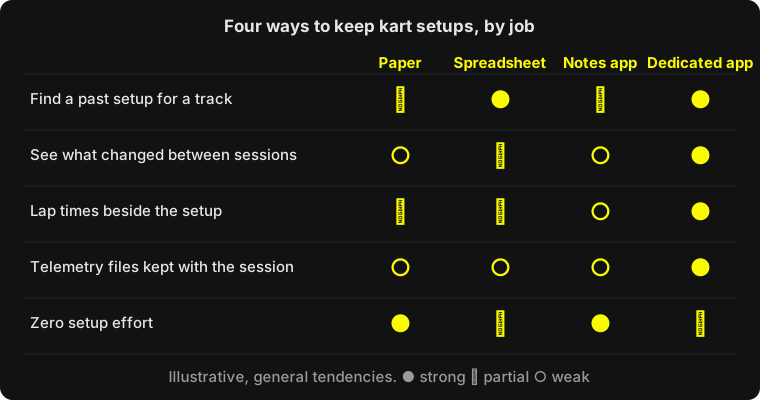
The weakest point of paper and notes is comparison. You can write “rear sprocket down a tooth” faithfully for a year and still have no quick way to see every session at one circuit with the same tyres and similar temperatures. That’s the work software is for.
What features matter most?
Prioritise comparison, baselines and data import. Those three change decisions; the rest mostly changes convenience.
- Compare two sessions. Differences should be highlighted, not hunted for.
- Setup change attribution. Seeing the changes between consecutive sessions next to the lap time delta turns hunches into evidence, with the caveat that one session’s delta also reflects track and tyre conditions.
- Baseline and copy-forward. Starting from last session or your baseline saves typing at the track, where people skip fields.
- Logger compatibility. Check the exact files your device exports.
- Maintenance tracking. Engine and carb rebuild intervals and tyre sets are setup-adjacent and easy to forget.
- Team access. If a mechanic or coach needs the same data, check how sharing works and what it costs.
Be wary of anything that promises to tell you the “perfect setup”. Software records and compares; you and your mechanic still decide, and every chassis manufacturer’s guidance still applies.
What does this look like in KartSetups?
KartSetups is a UK-built app for exactly these jobs. Sessions are grouped by meeting, each showing best lap and delta, and you can create a new session from a baseline.
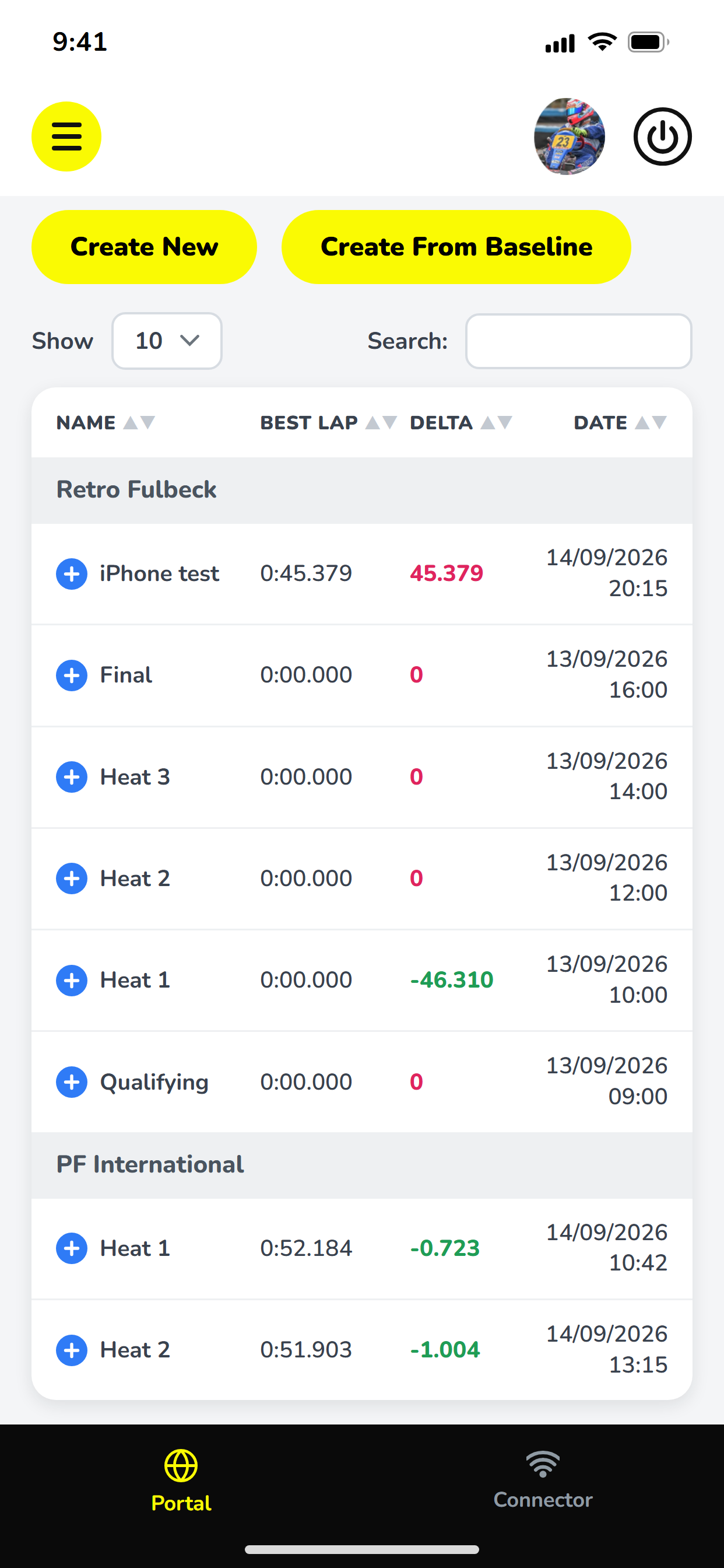
From the release notes, the platform includes Compare Setups, setup change attribution, a knowledge base grouping your setup changes by track, imports from AIM, Alfano and Starlane devices, video telemetry from GoPro or DJI footage, file storage, maintenance alerts and an AI Kart Engineer chat. Plans cover a solo driver, a driver and mechanic, or a whole team; see pricing for current prices.
It isn’t the only route. If you prefer a spreadsheet, build one with the three-block layout and be strict about filling it in.
How should you choose?
Run a one-meeting test. Use whichever tool you’re considering for a single race weekend, alongside your usual method, and ask afterwards:
- Did I fill it in at the track without it slowing us down?
- Could I find and compare yesterday’s sessions in under a minute?
- Did it hold my lap times and data, or did I still need other places?
- Could my mechanic or coach use it too?
If the answers are yes, keep it. If you stopped using it by Saturday afternoon, no feature list will fix that. Habit beats software, so pick the one you’ll actually use every session.